Start a Window Sync Session
Use Quick Launch or Launch and Maintain Browser Profiles to open the profiles that will participate, then open the standalone Window Sync menu. Running profiles that support synchronization appear automatically under Open Profiles.
Select Profiles and a Controller
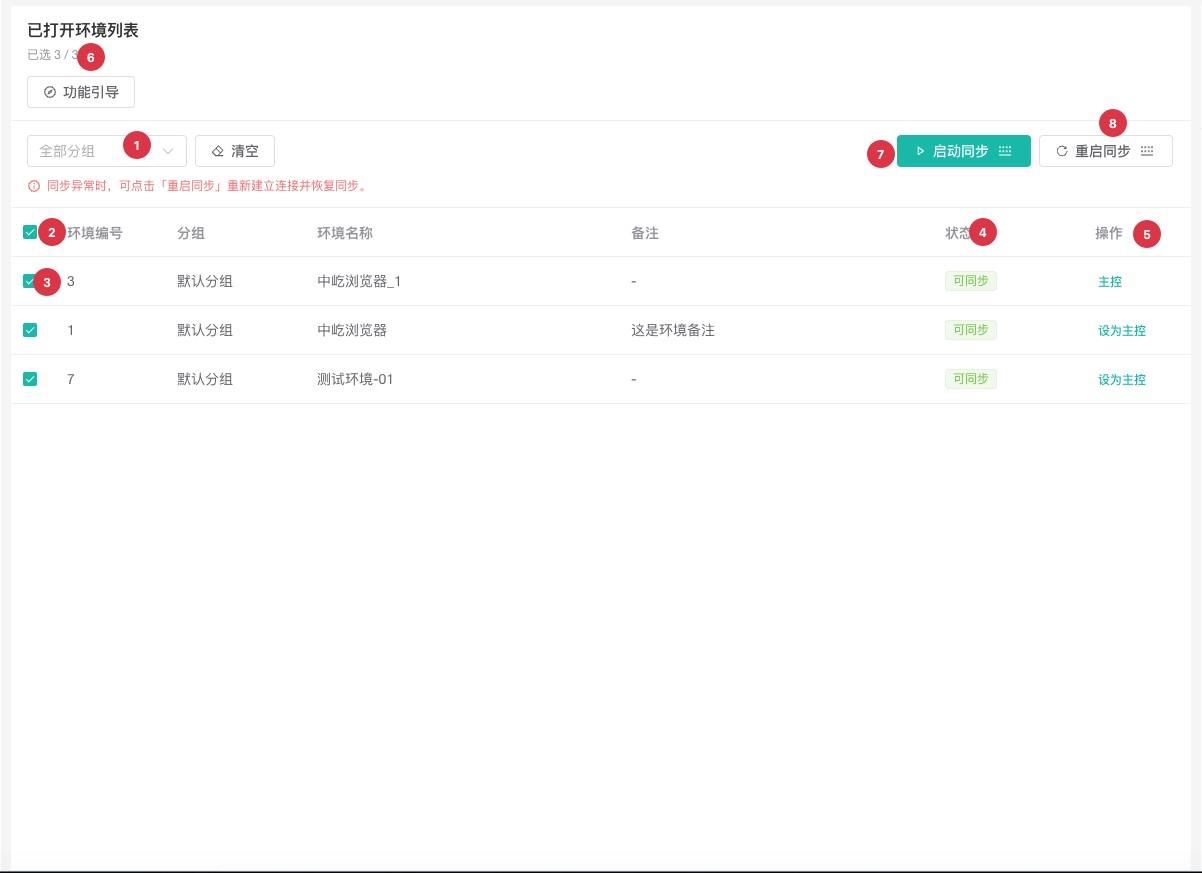
| No. | Feature | Description |
|---|---|---|
1 | Group filter | Displays only open profiles in the selected group |
2 | Select all available profiles | The header checkbox selects only Available profiles in the filtered results; disabled profiles are excluded |
3 | Individual selection | Selects exact participants; at least two are required |
4 | Sync status | Available can join; Disabled displays a reason that must be resolved first |
5 | Set as Controller | Designates the action source. The controller must be selected, and each session supports only one |
6 | Selection count | Displays selected and total open profile counts for scope verification |
7 | Start Sync | Available after selecting at least two available profiles and one controller; creates the real-time session |
8 | Restart Sync | Reconnects using the current selection, controller, and settings, including after an error |
Start a Session
- Launch every participating profile and open identical or corresponding business pages.
- Open
Window Syncand wait for the profiles to appear underOpen Profiles. - Filter by group if needed and select at least two
Availableprofiles. - Click
Set as Controllerfor one selected profile. - Verify the selection count and controller, then click
Start Sync. - Perform one low-risk click, input, or scroll action and confirm that every target responds consistently.
Change a Running Session
You can change selections or designate another controller while synchronization is running, but those changes do not enter the active session until you click Restart Sync. After changing Sync Settings, save them and validate the session again as prompted.
| Action | Result | Use case |
|---|---|---|
Stop Sync | Closes the controller event bridge and target connections so keyboard and mouse events are no longer distributed | Pause a batch action, prepare page state changes, or finish the task |
Restart Sync | Recreates the session with the current selection, controller, and settings | Add or remove profiles, change the controller or settings, or recover from a connection issue |
Clear | Clears selected profiles without closing their browser windows | Select a different set of participants |
WARNING
Closing the controller browser window stops the session and closes its target windows. Save business data in every window first. To end synchronization without closing the windows, use Stop Sync.