Use the Sync Console
The console on the right side of Window Sync contains Window Management, Text Management, and Tab Management. Its header displays the current controller, session status, and target monitor. Text and tab commands require an active session and apply to windows in that session.
Window Management
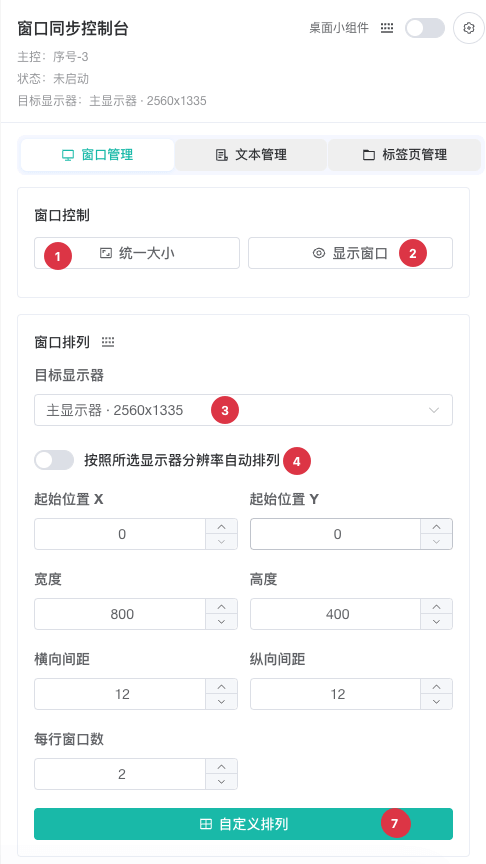
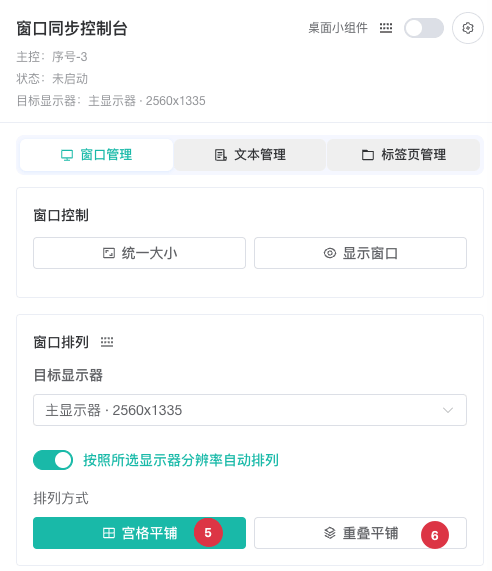
| No. | Feature | Description |
|---|---|---|
1 | Match Size | Resizes targets to match the controller, reducing coordinate differences before synchronization |
2 | Show Windows | Brings selected windows onto the desktop so hidden or minimized windows can be checked |
3 | Target Monitor | Selects the monitor used for layout; in a multi-monitor setup, verify its name and resolution |
4 | Auto Arrange | Uses a preset layout for the target monitor resolution; disable to enter custom positions and dimensions |
5 | Grid Layout | Tiles windows in a grid for concurrent observation; mutually exclusive with Custom Layout |
6 | Cascade Layout | Cascades windows to preserve title areas in limited space; mutually exclusive with Custom Layout |
7 | Custom Layout | Arranges windows after configuring starting X/Y, width, height, horizontal and vertical gaps, and windows per row |
Display scaling can differ across monitors. After arranging windows, check their boundaries, webpage zoom, and click positions before beginning production synchronization.
Text Management
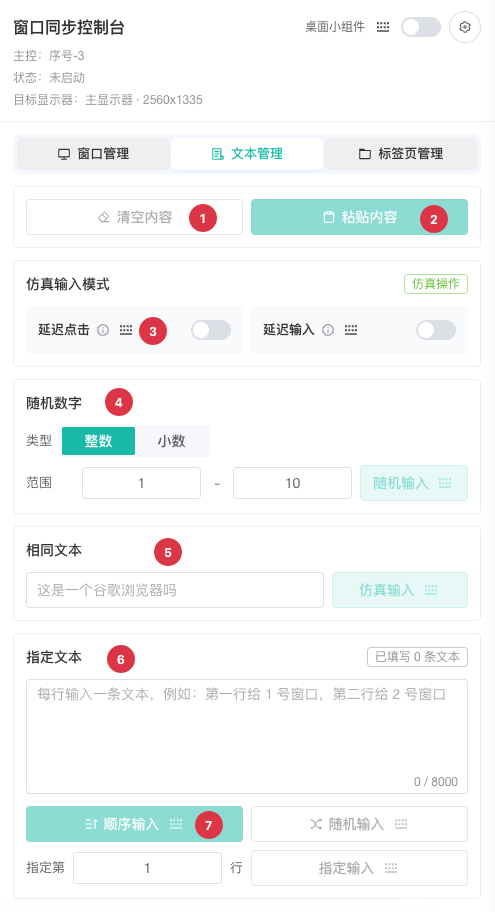
| No. | Feature | Description |
|---|---|---|
1 | Clear Content | Clears the focused input field in each target; verify focus first |
2 | Paste Content | Reads clipboard text and pastes it into the target fields; reports an empty or inaccessible clipboard |
3 | Simulation switches | Click Delay waits a random interval before a commandTyping Delay enters text character by character at the configured speedConfigure ranges under Sync Settings |
4 | Random Number | Select integer or decimal and a range; decimal mode supports 0-10 decimal places. Each target can receive a different value |
5 | Same Text | Sends the same text to every target window |
6 | Assigned Text | Enter one value per line to distribute different content by window |
7 | Assignment mode | Sequential assigns lines in window orderRandom selects lines randomlySpecified sends one selected line to all windows |
Text commands depend on webpage focus. Confirm that the intended field is editable in the controller and targets to avoid sending content to a search box, address bar, or other unintended location. Never expose passwords, verification codes, or secrets in shared screenshots.
Tab Management
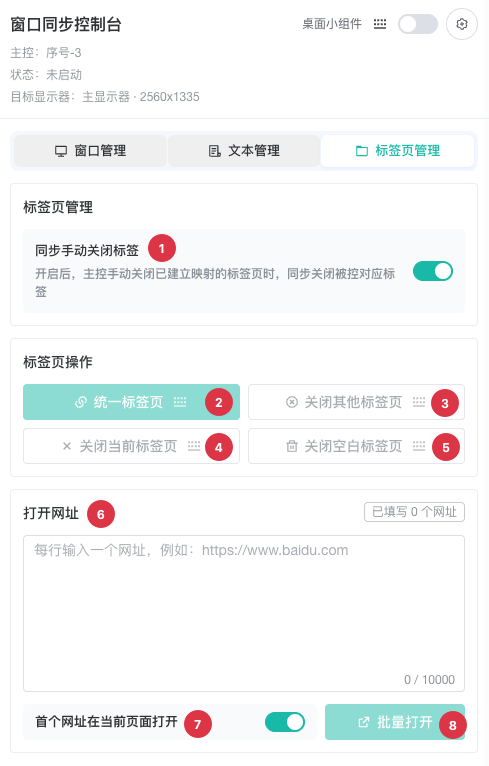
| No. | Feature | Description |
|---|---|---|
1 | Sync manually closed tabs | When the controller manually closes a mapped tab, attempts to close the corresponding target tabs |
2 | Align Tabs | Matches target tab structures to the controller to establish consistent mappings before other tab actions |
3 | Close Other Tabs | Keeps the current tab in each target and closes the others |
4 | Close Current Tab | Closes the active tab; warns if a profile has only one tab remaining |
5 | Close Blank Tabs | Removes blank tabs while preserving normal business pages |
6 | URL list | Enter one complete URL per line for batch opening |
7 | First URL behavior | Enabled: reuses the current tab for the first URL and opens the rest in new tabs; disabled: opens every URL in a new tab |
8 | Open in Bulk | Sends the URL list to target windows in the active session |
TIP
Batch tab closing, tab alignment, and opening URLs modify multiple windows at once. Confirm the number of profiles in the session and save unsubmitted page content first.