Window Sync Overview
Window Sync is a standalone desktop client menu that synchronizes webpage actions from one controller profile to multiple target profiles. It is not available from Browser Profiles. Launch profiles through Quick Launch or Browser Profiles first, then open Window Sync and select the participating profiles.
Running profiles appear automatically under Open Profiles; you do not need to select or transfer them from Browser Profiles. A profile launched by legacy RPA cannot participate. A profile is disabled while an RPA task is running and becomes available again when the task ends and its window reconnects.
Page Layout
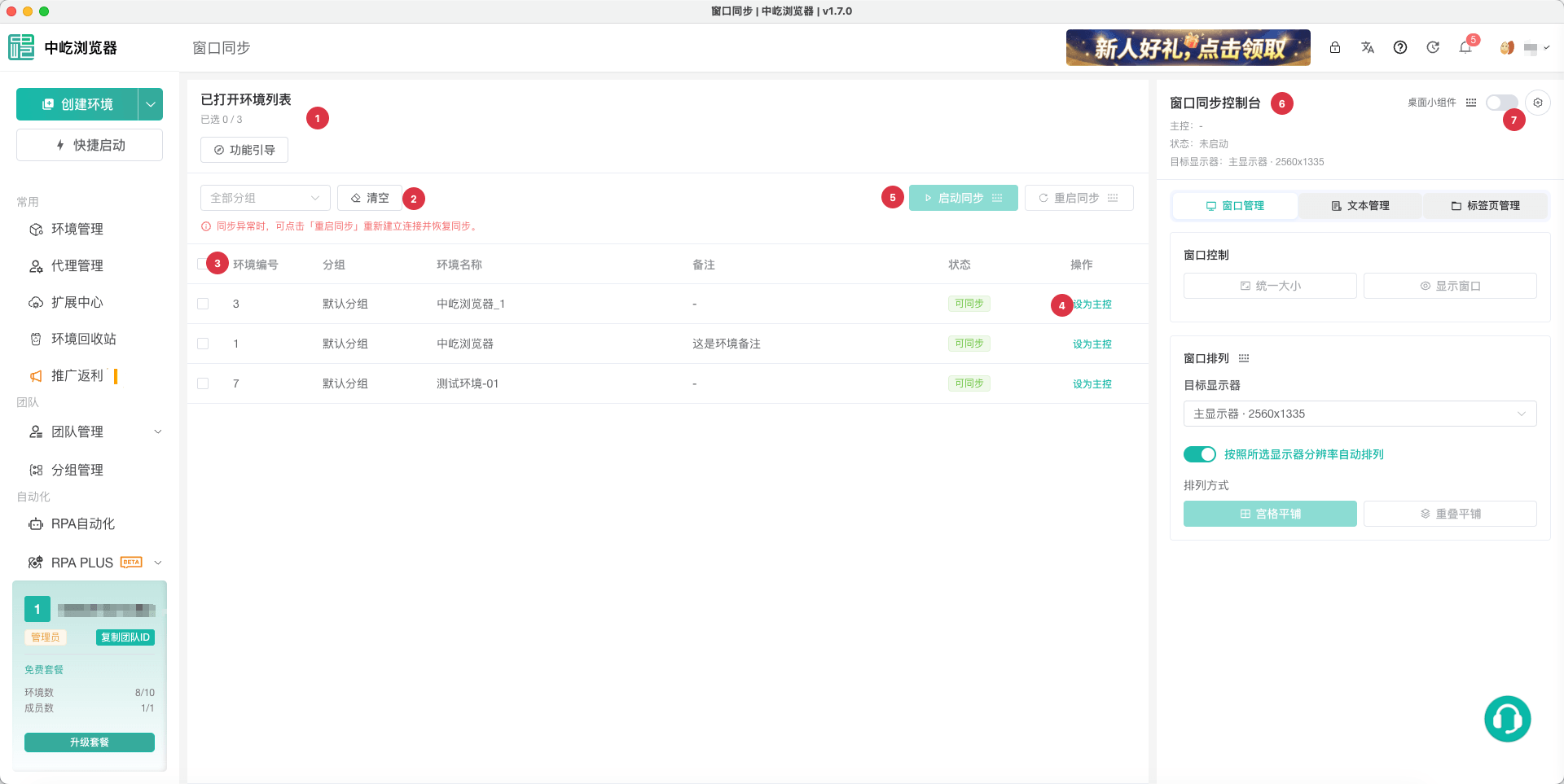
| No. | Feature | Description |
|---|---|---|
1 | Open Profiles | Automatically lists running profiles; stopped profiles do not appear |
2 | Filter and clear | Filter by group; Clear removes only the current selection and does not close profiles |
3 | Profile selection and status | Select participating profiles. Available can join a session; a disabled profile displays the reason it cannot join |
4 | Controller selection | Designate one selected, available profile as the controller; all other selected profiles are targets |
5 | Session controls | Start Sync creates a session, Stop Sync ends it, and Restart Sync reconnects with the current selection and settings |
6 | Sync console | Contains Window Management, Text Management, and Tab Management; commands apply to the current targets |
7 | Widget and settings | Display the console as a desktop widget or configure events, simulation speed, and shortcuts |
Requirements
- Window Sync is available only in the desktop client.
- Select at least
2open profiles with anAvailablestatus. - Each session must have exactly
1controller profile. - Participating profiles should display identical or corresponding pages. Different zoom levels, dialogs, or login states can produce inconsistent results.
- Before production use, verify clicking, input, scrolling, and tab behavior on a test page.
Synchronization Scope
| Type | Capabilities | Key consideration |
|---|---|---|
| Real-time events | Keyboard input, mouse clicks, scrolling, and pointer movement | Each event is controlled by its switch under Sync Settings |
| Window actions | Show windows, match sizes, grid layout, cascade layout, and custom layout | Confirm the target monitor and display scaling before arranging windows |
| Text actions | Clear, paste, random numbers, shared text, and assigned text | Focus the intended webpage field before sending a text command |
| Tab actions | Align tabs, close tabs, and open URLs in bulk | Close commands can change the page state of every participating window |