Manage App and Browser Kernel Versions
In the desktop client, Settings > Version Management displays the current version, latest version, and update status for ZYBrowser and YiBrowser kernels. This tab is not available in the web app. When you enter the page, the client retrieves the latest kernel versions available for the current platform.
Update ZYBrowser
The Software Version section displays the current client version, latest version, and update status. When an update is available, review the Changelog, then click Update to Latest. Download progress and speed appear during the download. After the download finishes, quit ZYBrowser normally to install the new version automatically.

| No. | Feature | Description |
|---|---|---|
1 | Current version and status | Shows the installed ZYBrowser version and a status such as checking, update detected, downloading, download failed, downloaded, or up to date |
2 | Latest version | Shows the latest client version available for the current platform |
3 | Changelog | Appears when release notes are available; click it to review changes by version |
4 | Update to Latest | Appears when a new version is detected or a download fails; starts or retries the download |
After you click Update to Latest, the button disappears and the page displays download progress and speed instead.
If the download fails, the reason appears below the progress area. Click Update to Latest again to retry.
Install a release marked Force Update as soon as possible. When the status changes to Downloaded. It will install after you quit the app, save any work in progress and quit the client normally.
Manage YiBrowser Kernels
The Browser Kernels section lists the installed version, latest available version, update status, and actions for each major version. Automatic Kernel Updates updates installed kernels to their latest versions; it does not install a major version that is not already present. Forced kernel updates are not controlled by this switch.
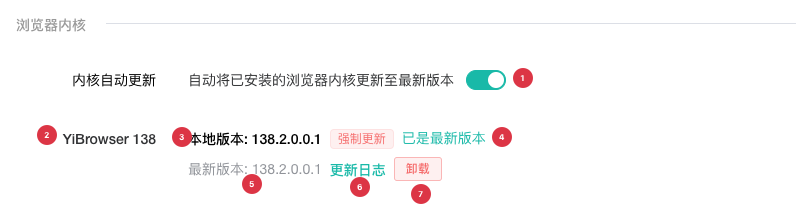
| No. | Feature | Description |
|---|---|---|
1 | Automatic Kernel Updates | When enabled, automatically updates installed kernels to the latest compatible versions; forced updates still run when it is disabled |
2 | YiBrowser major version | The pictured entry is YiBrowser 138; each major release line is installed and maintained independently |
3 | Installed version | Shows the latest version installed locally; displays - when the major version is not installed |
4 | Version status | The pictured installed and latest versions match, so the status is Up to date; it changes to Update available when a newer version exists |
5 | Latest version | Shows the latest kernel version compatible with the current platform and client version |
6 | Changelog | Appears when release notes are available; click it to review changes for that kernel version |
7 | Uninstall | Removes all local versions in that YiBrowser major release line after confirmation |
The screenshot shows an installed kernel that is already up to date, so no install or update button appears. Available actions change with the page state:
- If the major version is not installed, the installed version displays
-and the page providesInstall Now. - When a newer kernel is detected, the status changes to
Update availableand the page providesUpdate to Latest. - If an installation or update fails, the page displays the error and provides
Retry. - If the kernel requires a newer client, the page displays
Update the app first. Update ZYBrowser before working with that kernel.
During installation or update, the page reports queued, downloading, verifying, installing, and old-version cleanup stages with progress.
Handle Kernels in Use
Before manually updating or uninstalling a kernel, stop browser profiles and automation tasks that use the same kernel major version.
| Usage state | During install or update | During uninstall |
|---|---|---|
| Standard browser profile is running | ZYBrowser asks to close the affected profiles and continues after they close successfully | The operation is blocked; close the affected profiles and retry |
| Legacy RPA or RPA task is running | The operation is blocked; wait for the task to end and close the affected profiles | The operation is blocked; wait for the task to end and close the affected profiles |
| Automatic update is waiting for profiles to close | The update continues automatically after the profiles close | Uninstall cancels the waiting automatic update, then checks again for active usage |
| Another task exists for the same kernel | Wait for the current task to finish | Wait for the current task to finish |
WARNING
Uninstall removes all local versions in the selected YiBrowser major release line. If a browser profile still depends on that major version, its next launch may need to download the kernel again. Uninstall only after confirming that it is no longer needed.