Configure the Proxy API
Proxy API is intended for providers that return an available proxy address through a fetch URL. When saving, the desktop client requests the URL and extracts IPv4:port from the text response. The URL must therefore be reachable and return a valid IPv4 address and port. The fetched proxy can use either a provider IP allowlist or username and password authentication.
Add a Proxy API
On the Proxy API page, click Add Proxy, enter the name, protocol, fetch policy, authentication type, and URL, then click Check URL. ZYBrowser fetches the current IP and port again when saving.
| Field | Description |
|---|---|
Name | Required; identifies the fetch URL |
Proxy protocol | HTTP, HTTPS, or SOCKS5 |
IP lookup service | Currently supports ip2location |
IP protocol | Currently supports IPv4 only |
Fetch policy | Fetch a new IP every time the profile opens or Fetch again only when the previous IP is no longer valid |
Authentication Type | Whitelist is the default; select Credentials when the provider requires proxy credentials |
API URL | Must begin with http:// or https:// and return text containing IPv4:port |
Account | Displayed and required only for Credentials; used to connect to the fetched proxy |
Password | Displayed and required only for Credentials; used to connect to the fetched proxy |
Assigned profiles | Select existing profiles while saving |
Notes | Store nonsensitive information only; never paste a key or token from the URL |
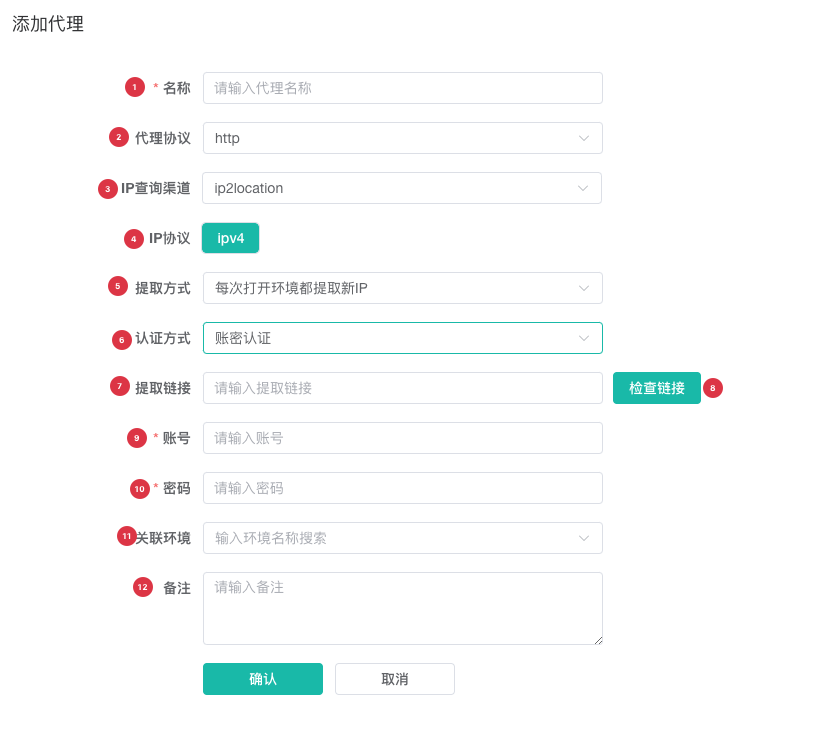
| No. | Feature | Description |
|---|---|---|
1 | Name | Required; preferably identifies the provider or use case |
2 | Proxy protocol | Must match the protocol of the fetched proxy |
3 | IP lookup service | Currently uses ip2location |
4 | IP protocol | Currently supports IPv4 only |
5 | Fetch policy | Controls when the client requests the URL while launching an assigned profile |
6 | Authentication Type | Selects provider allowlist or credential authentication |
7 | API URL | Accepts only a valid HTTP or HTTPS URL |
8 | Check URL | Confirms that the URL returns a parseable IPv4:port |
9 | Account | Required for credential authentication and used exactly as entered |
10 | Password | Required for credential authentication; use the field icon to reveal it temporarily |
11 | Assigned profiles | Assigns the API proxy directly to existing profiles |
12 | Notes | Describes its purpose without exposing the URL or proxy credentials |
Check URL and IP fetching require the desktop client. The web app cannot perform the local check. Check URL confirms only that the URL returns a proxy address; it does not validate the allowlist or credentials for that address. Save the Proxy API, then use Test Proxy to test the actual connection.
Choose an Authentication Type
| Authentication type | Use when | Connection behavior |
|---|---|---|
Whitelist | The provider has allowlisted the current device's network egress IP | The client connects directly to the fetched address without sending a proxy account or password |
Credentials | The provider supplies an account and password for its proxy nodes | ZYBrowser uses the account and password to connect to the fetched address when testing the proxy and launching a profile |
Whitelist is the default. Existing Proxy API records that do not contain an authentication type also use this mode. With Credentials, both fields must contain a non-whitespace value and are used exactly as entered. Switching back to Whitelist clears the saved account and password.
These credentials authenticate the connection to the fetched proxy address; they are not used to request the API URL. If the URL itself requires a token or signature, continue to include it as required by the provider and protect the complete URL.
Understand Fetch Policies
| Fetch policy | Suitable provider behavior | Result |
|---|---|---|
Fetch a new IP every time the profile opens | Each request should return a new egress IP | Requests the API URL whenever an assigned profile launches |
Fetch again only when the previous IP is no longer valid | Reuse the current IP whenever possible | Tests the saved IP first and requests a new one only after it becomes unavailable |
Confirm the provider's rotation rules and rate limits before choosing a policy. Do not use frequent fetching against a rate-limited endpoint.
Proxy IP Lifetime
Proxy APIs generally provide rotating proxies, and each IP has a limited lifetime. If the active proxy expires while a profile is running, ZYBrowser does not automatically fetch a replacement. Restart the profile so the client can update the IP according to the configured policy. Confirm the provider's IP lifetime and plan profile usage and restart times accordingly.
Do not use a rotating proxy if your workflow requires an immutable proxy.
Test and Update the IP
When you click Test Proxy in the list, the client tests the saved IP and port with the selected authentication type. If they work, it updates only the test status. If they fail, it requests the API URL, parses a new IPv4:port, retains the authentication type, saves the endpoint, and tests again.
If the URL does not return a parseable address, the list reports a fetch failure. Confirm that the URL is complete, whether the provider requires an IP allowlist, whether the response is plain text, and whether the port is between 1 and 65535.
Maintain Records
Filter Proxy API records by ID, name, notes, or protocol. Edit the name, notes, or protocol directly in the list. Use the full edit form to change the URL, fetch policy, authentication type, account, password, or assigned profiles. Before deleting, confirm that no profile still relies on the proxy.
Next Steps
- Test, Assign, and Maintain Proxies: Test a fetched IP and assign browser profiles.
- Proxy Troubleshooting: Resolve URL fetch or proxy test failures.