Data Processing Nodes
Data Processing nodes transform upstream raw content into the format required by downstream nodes. This guide covers all 5 Data Processing nodes.
These nodes do not automatically change the source variable. Except for Variable Manager, save the processed result to a new output variable.
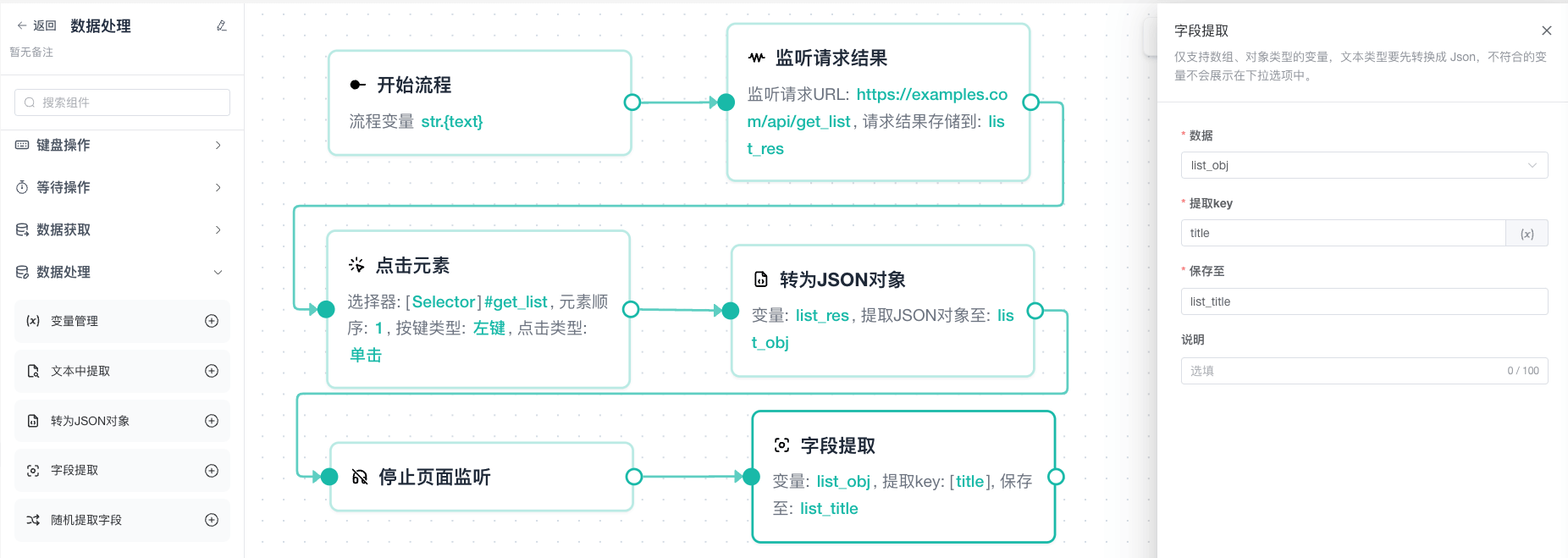
Variable Manager
Creates or updates one or more variables in the middle of a workflow, using the same variable editor as Start Flow.
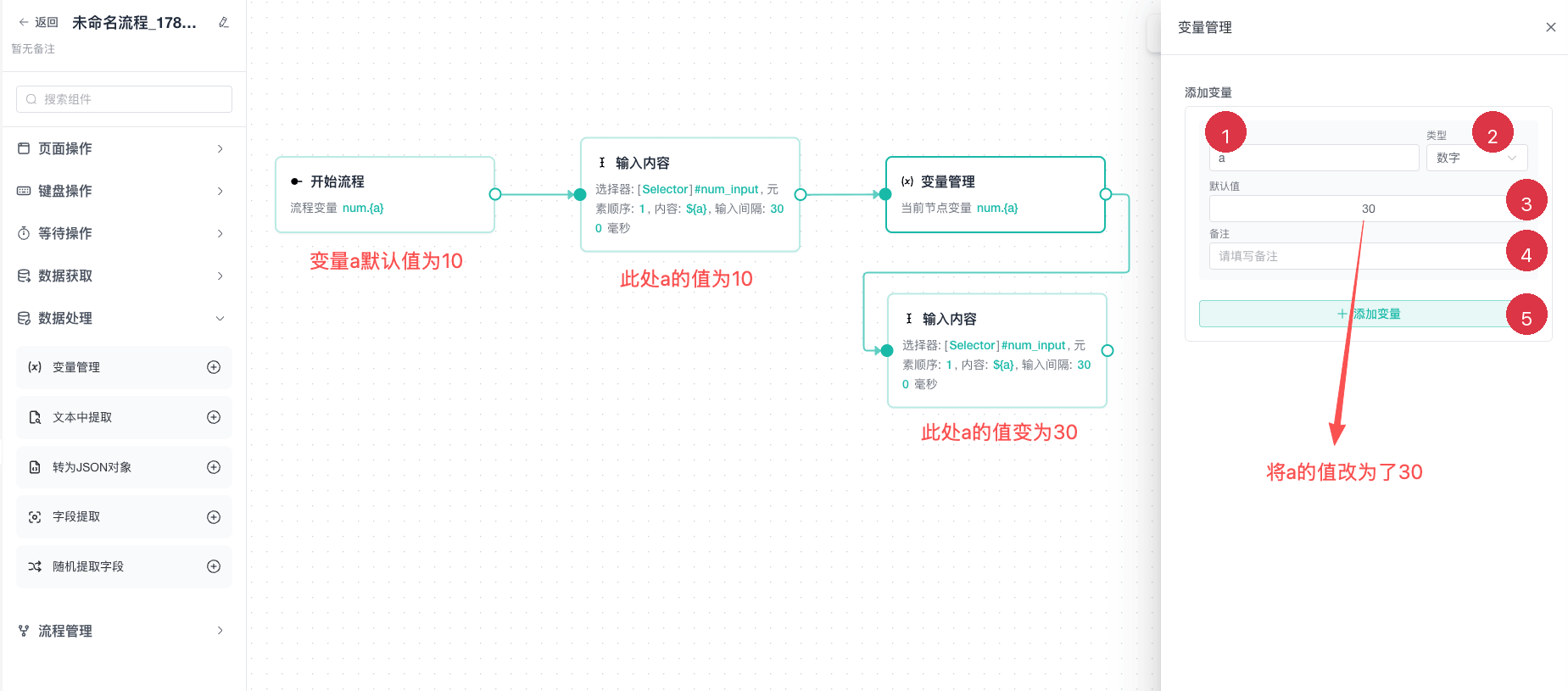
| No. | Setting | Description |
|---|---|---|
| 1 | Variable name | Enter a valid, unique variable name |
| 2 | Type | Select a data type such as string, number, boolean, array, or object |
| 3 | Default value | Enter a value that matches the selected type |
| 4 | Note | Optionally describe the variable purpose |
| 5 | Add variable | Add another variable to the current node |
A later definition overrides an earlier variable with the same name. Values created here are available only on downstream reachable paths. See Variables and Data for names, types, and JSON rules.
Extract Text
Uses a regular expression to extract content from a selected variable and saves the result.
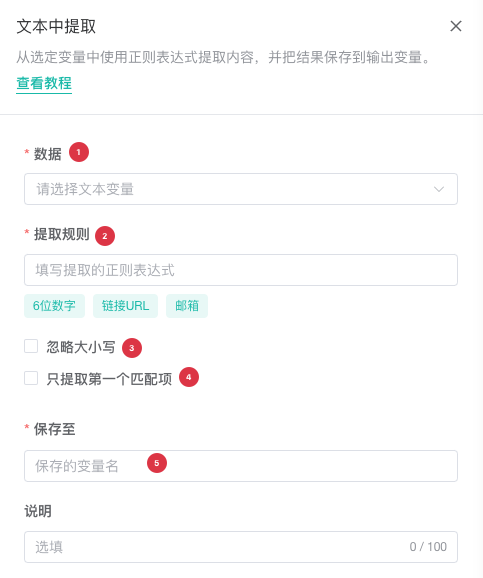
| No. | Setting | Description |
|---|---|---|
| 1 | Data | Select the upstream variable containing the source text |
| 2 | Extraction rule | Enter a valid regular expression or use a common-rule shortcut |
| 3 | Ignore case | Enable case-insensitive matching |
| 4 | First match only | Enable to return the first match; disable to return all matches |
| 5 | Save to | Enter a valid output variable name |
For this source text:
Order: ZY-20260724, Status: CompleteUse this regular expression to extract the order ID:
ZY-\d+Regular Expressions
Parse JSON
Parses JSON text from a selected variable into an object and saves the result.
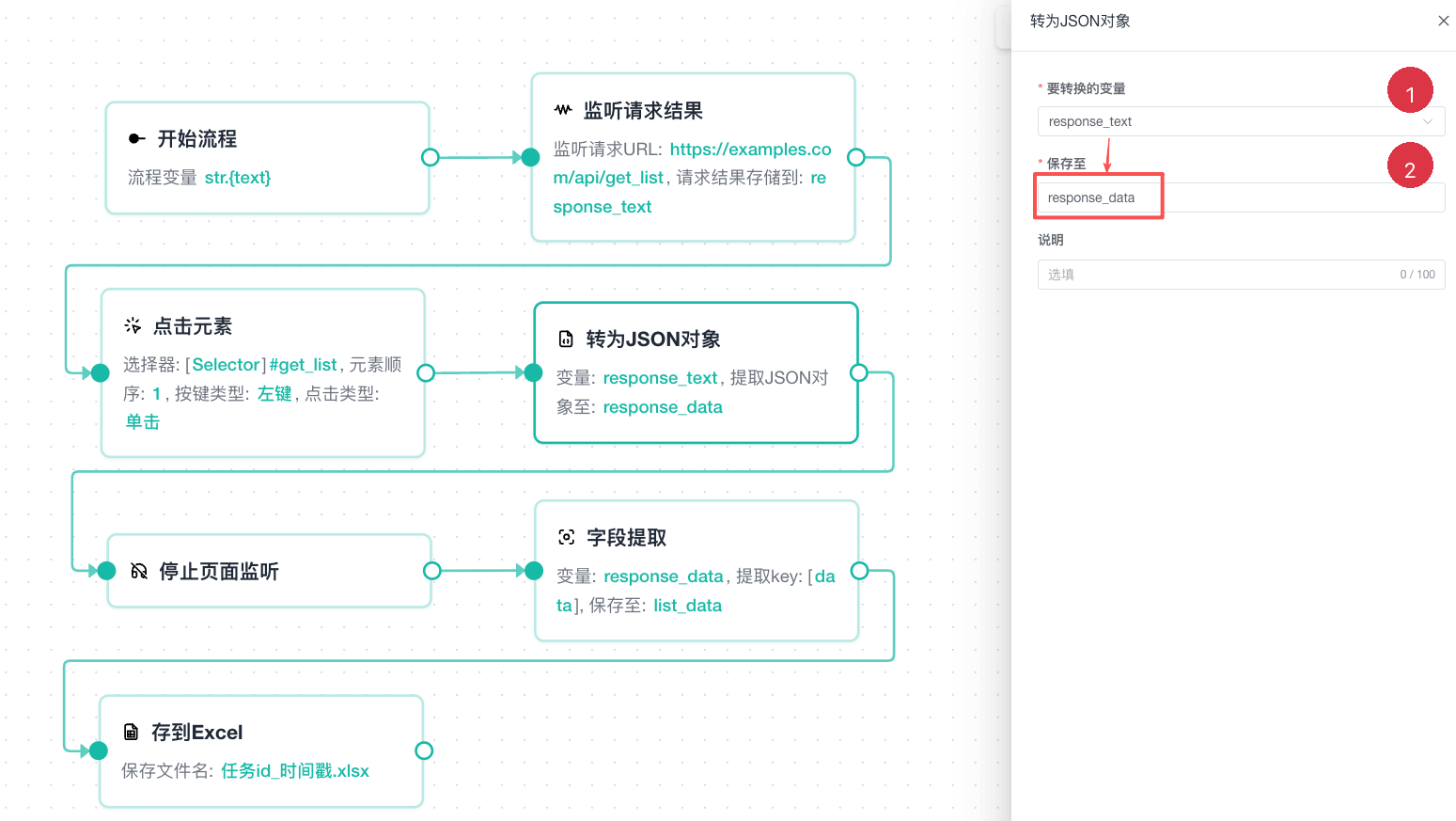
| No. | Setting | Description |
|---|---|---|
| 1 | Source variable | Select the variable containing valid JSON text |
| 2 | Save to | Enter the output variable for the parsed object |
The input must be valid JSON. For example:
{"name":"Sample product","price":99.9,"in_stock":true}If the input contains a prefix, extra log text, or incomplete JSON, clean it with Extract Text before parsing.
Extract Field
Reads a field from an array, object, or unknown-type variable and saves it.
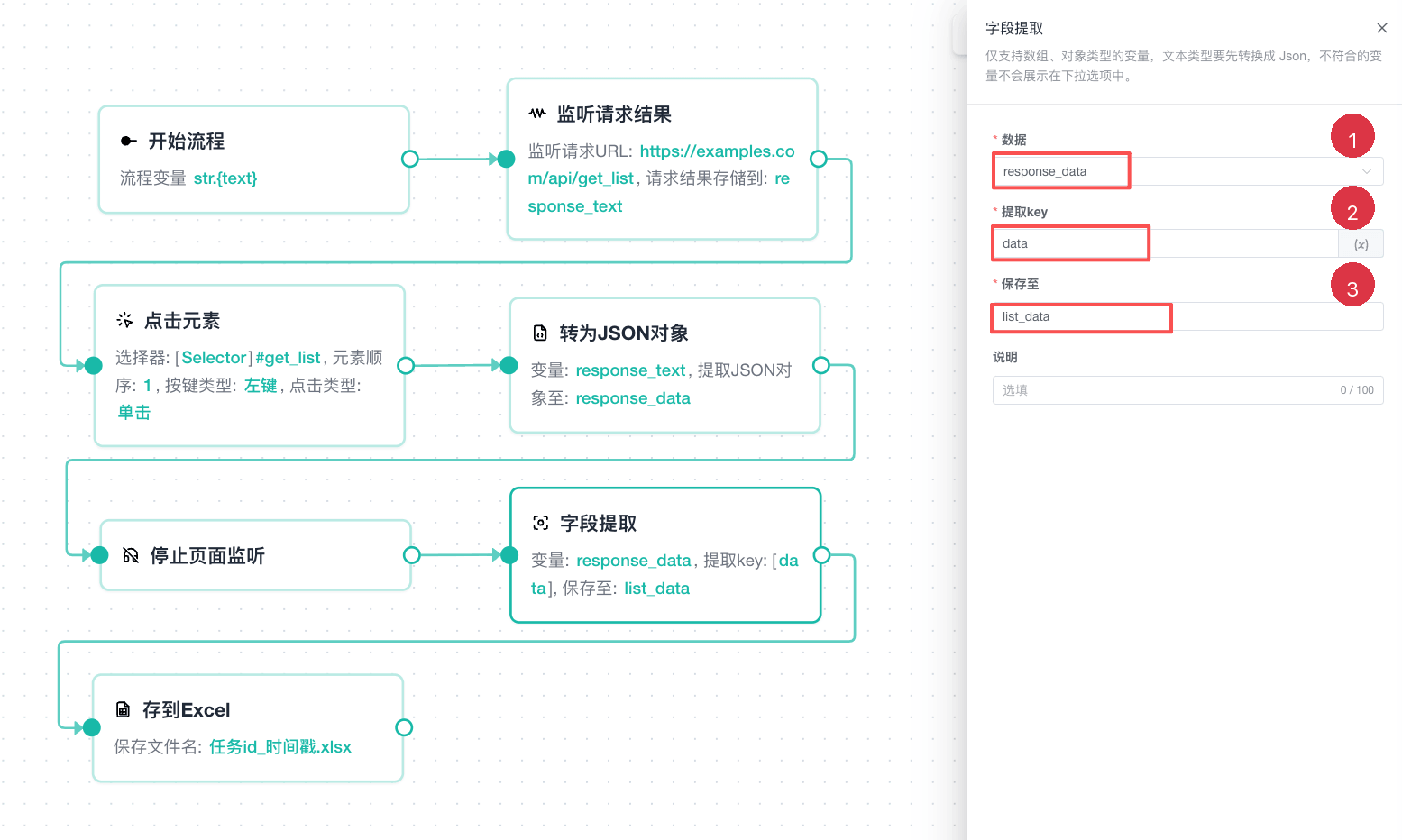
| No. | Setting | Description |
|---|---|---|
| 1 | Data | Select an array, object, or unknown-type input variable |
| 2 | Key | Enter an object key or array index; variables are supported |
| 3 | Save to | Enter a valid output variable name |
Object example:
{"username":"demo@example.com","roles":["admin","editor"]}Enter username to get demo@example.com. Array indexes are not the same as the user-facing natural order used by element selectors, so follow the node hint and verify with test data.
Extract Random Field
Selects a random field from an array, object, or unknown-type variable and saves it.
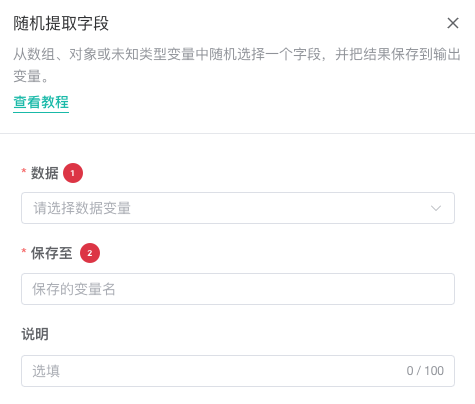
| No. | Setting | Description |
|---|---|---|
| 1 | Data | Select an array, object, or unknown-type input variable |
| 2 | Save to | Enter a valid output variable name |
An empty input cannot produce a useful result, so test for existence with IF or guarantee data upstream. For repeatable or ordered behavior, use Extract Field or For Data.
Processing Examples
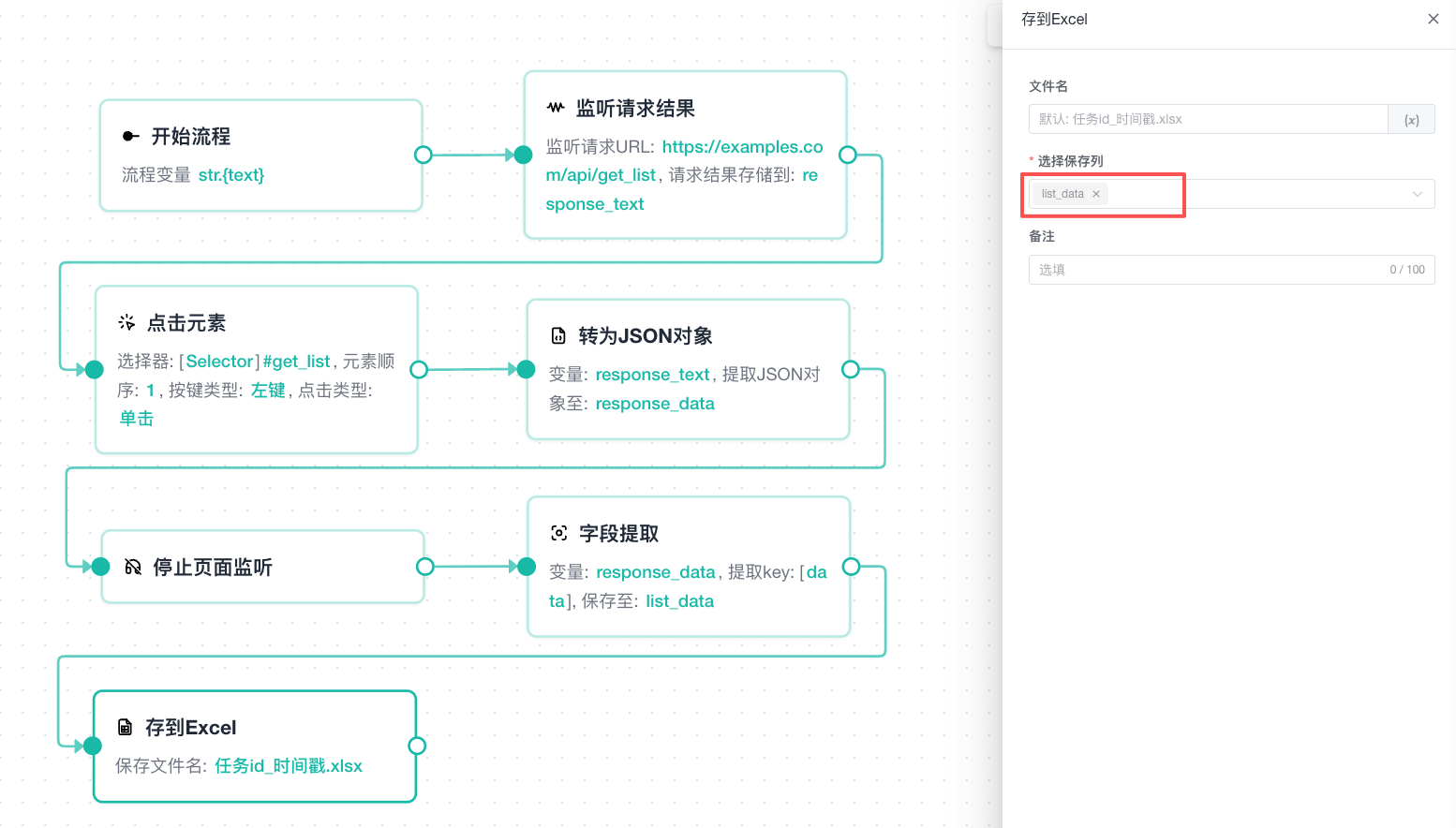
Parse an API Response
Listen for Response → Parse JSON → Extract Field → Save to Excel- Save the endpoint response to
response_text. - Parse it as JSON and save it to
response_data. - Extract the required field from
response_data. - Write the final variable to Excel.
Read an ID from Text
Get Clipboard Content → Extract Text → Enter Text- Read the clipboard text.
- Extract the business ID with a regular expression.
- Enter the output variable in the page form.
Select a Random Material
- Create an array variable named
messagesin Start Flow. - Add Extract Random Field and select
messagesas the input. - Save the result to
current_message. - Reference
${current_message}in Enter Text.
Common Issues
JSON Parsing Fails
Check for straight double quotes, valid braces, and commas, with no prefix or suffix outside the JSON. Empty or truncated responses also fail parsing.
Extract Field Returns Empty
Inspect the actual upstream structure and check object key capitalization or the array index. Object keys are case-sensitive.
A Variable Still Has Its Old Value
Confirm that the consumer is downstream from Variable Manager and no separate branch bypasses the update. A later definition applies only after that node executes.
Random Extraction Is Unstable
This is expected. Use Extract Field for deterministic debugging or For Data to process every item.
Related Guides
- Variables and Data: Review variable types, naming, and overrides.
- Data Collection and Storage Nodes: Collect page, request, and file data.
- Flow Control Nodes: Process data with conditions and loops.