View Balance and Add Funds
Balance displays the active team's balance and transaction history. The refresh button reloads the balance. Filter the list by transaction type or date range and sort by transaction time. To add funds, create an online top-up order or view the recipient account details for a corporate transfer.
View Transactions
Transaction types include Top-up, Purchase, Promotional Credit, and Purchase Credit. Each record displays the balance before the transaction, change amount, resulting balance, time, description, and operator.

Create a Top-up Order
- Click
Add Funds. - Select a preset amount or enter a custom amount.
- Select a payment method and submit.
- Complete payment through the QR code or payment page, then refresh the balance and transactions.
After payment, the active team's balance is updated. For an incomplete payment, open Order Management to continue payment or close the order.
Add Funds by Corporate Transfer
To transfer funds from a company bank account, click Corporate Transfer next to the balance. The dialog displays the transfer instructions, recipient account, and mobile number required in the transfer remarks. Use Copy to copy all recipient account details at once. The mobile number is masked on screen, but its Copy button copies the full number.
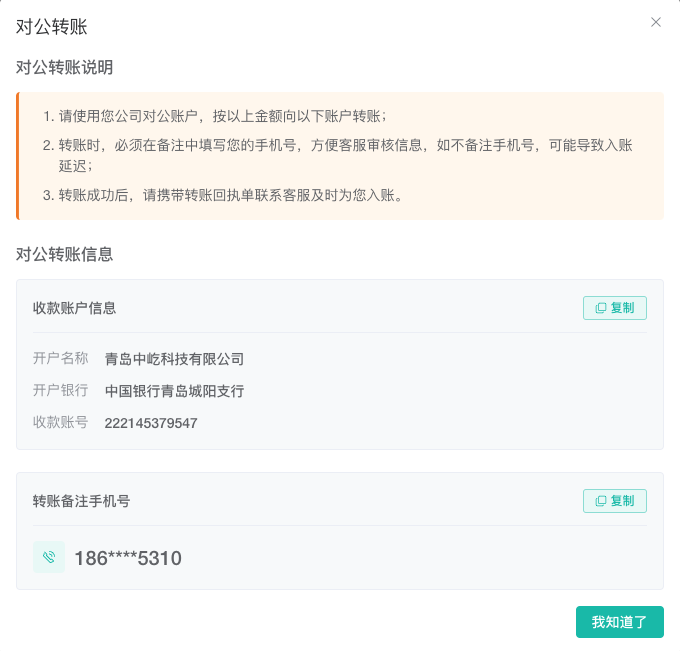
- Verify the recipient account shown in the dialog, then transfer funds from your company's corporate bank account.
- Enter the mobile number from the dialog in the bank transfer remarks so customer service can match the payment.
- Keep the transfer receipt. After the transfer succeeds, contact customer service, provide the receipt, and wait for the funds to be reviewed and credited.
The current recipient account is listed below. Before transferring, always use the details in the Corporate Transfer dialog you have just opened in ZYBrowser.
| Field | Details |
|---|---|
Account Name | 青岛中屹科技有限公司 |
Bank Name | 中国银行青岛城阳支行 |
Account Number | 222145379547 |
Important
- Use a company corporate bank account. Do not transfer from a personal bank account.
- The transfer remarks must contain the mobile number provided in the dialog. A missing or incorrect number may prevent customer service from matching the payment promptly and delay the credit.
- A completed bank transfer does not mean the team balance has been updated. After submitting the receipt, wait for customer service to review and credit the funds, then refresh the balance and transactions to verify the result.
- Recipient account details may change. Do not rely only on an old screenshot or saved details; verify the account name, bank name, and account number in the client before every transfer.