Purchase a Team Plan
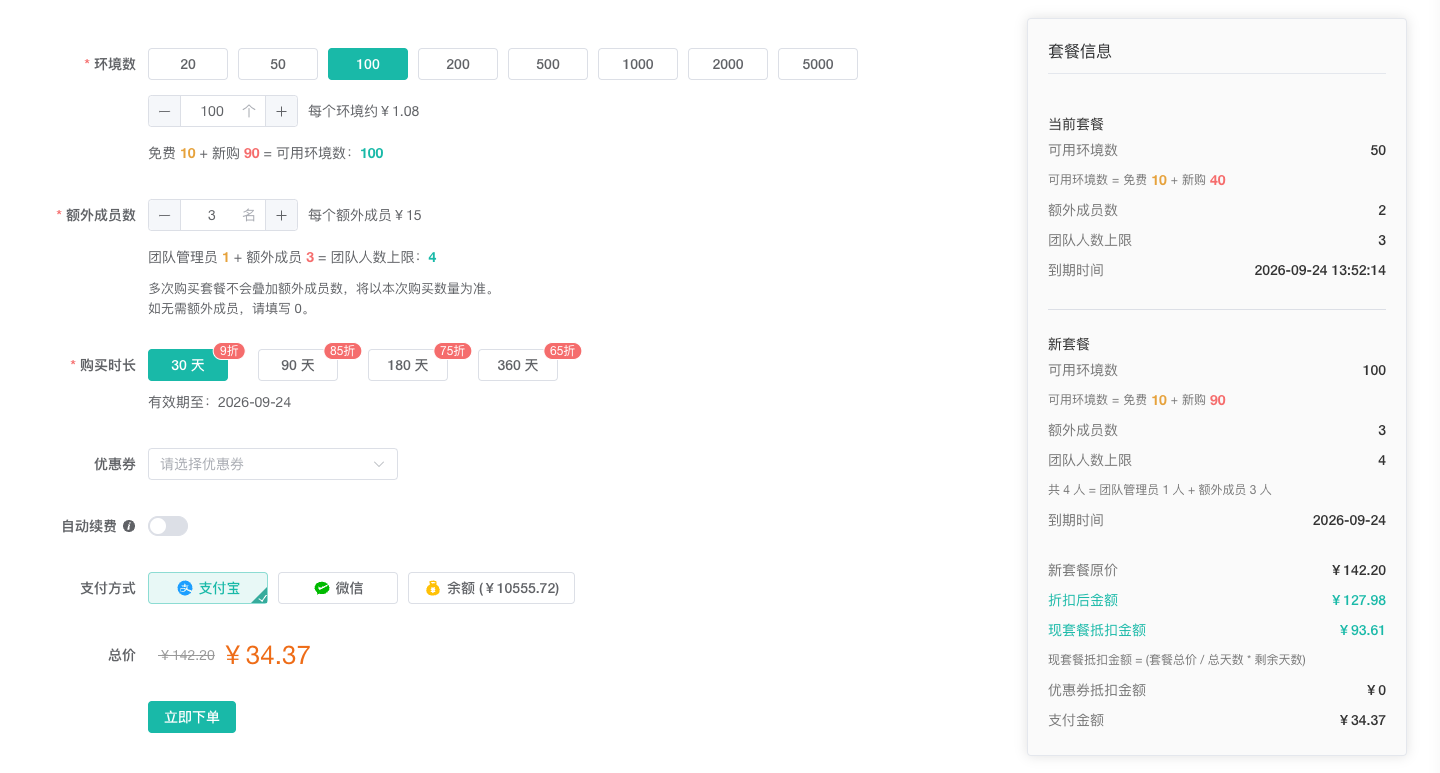
Purchase Plan sets the active team's browser profile capacity, additional member seats, and plan duration. The page calculates the original plan price, discounted price, current-plan credit, coupon discount, and amount due from the selected configuration and duration.
Plan Quantity Rules
| Setting | What to enter | Result after the plan takes effect |
|---|---|---|
Browser profiles | Enter the team's required total browser profile capacity by selecting a preset or entering a value | Total browser profile capacity, including the 10 profiles provided by the free plan |
Additional members | Enter the required number of members excluding the team administrator | Replaces the current additional member quota instead of adding to it |
Team capacity | No entry is required; the page calculates it automatically | 1 team administrator + the additional member quota |
- To add members while retaining the free plan's profile capacity, enter
10for the total browser profile capacity, then select the required number of additional members. - When the browser profile capacity is greater than
10, enter0if no additional members are needed.
Place an Order
- Open
Purchase Planunder Billing. - Set the target
Browser profilesvalue. The page shows the free profiles, newly purchased profiles, and resulting total capacity separately. - Set the target
Additional membersvalue and verify the calculatedTeam capacity. For repeat purchases, enter the target quota rather than the number of members you want to add this time. - Select the duration, coupon, auto-renewal setting, and payment method.
- Compare the current and new plans in the plan information panel, then review the original price, deductions, and amount due.
- Click
Paymentand verify the plan configuration and price again in theConfirm Orderdialog. - Click
Confirm Orderand complete payment.
Example
Suppose the team has 10 members: 1 team administrator and 9 additional members. If the target browser profile capacity is 100, enter:
Browser profiles:100, including10free profiles and90newly purchased profilesAdditional members:9
After purchase, the plan provides 100 browser profiles and a team capacity of 10 people (1 team administrator + 9 additional members).
Quota Reduction and Usage Warnings
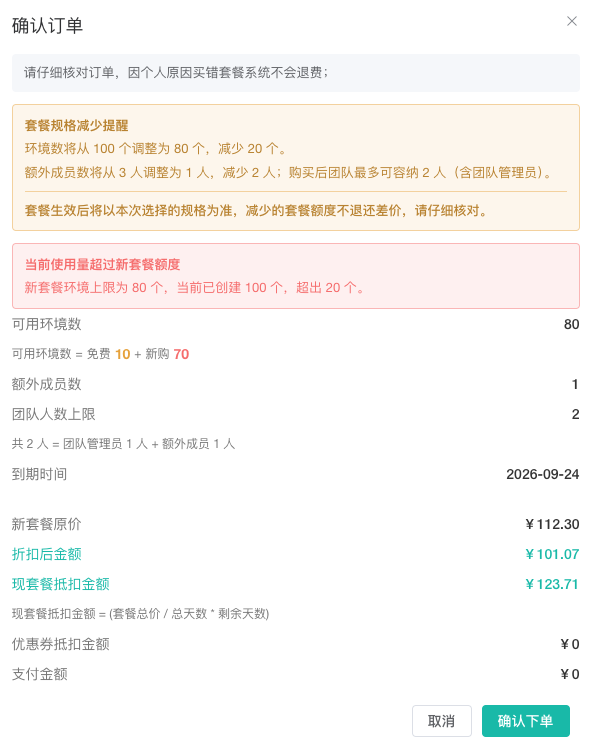
When the selected browser profile capacity or additional member quota is lower than the current plan quota, the Confirm Order dialog shows the old and new quotas, the reduction, and a warning that reduced quota does not receive a price-difference refund.
If the current number of browser profiles exceeds the new profile limit, or the current team size exceeds the new team capacity, the page shows the new limit, current usage, and exceeded amount. The Confirm Order dialog repeats the warning. Review the new plan configuration against current usage before submitting the order.
Important Rules
- Browser profile capacity is the total capacity after the plan takes effect and includes the
10profiles provided by the free plan. - Team capacity equals the additional member quota plus
1team administrator. - Additional member quotas do not accumulate across purchases. Enter the target additional member quota for the new plan.
- Reducing browser profile capacity or additional member quota does not provide a price-difference refund. Verify the configuration before submitting.
- If the current plan has not expired, its remaining time is converted into the
current-plan creditfor an upgrade or renewal. - Enable or disable auto-renewal in the plan order details. Ensure the team balance is sufficient before enabling it.