Configure Global and Menu Settings
Global Settings and Menu Settings save differently. Global Settings uses the remote global configuration service to save browser behavior for the active account. Menu visibility and order take effect immediately in the current desktop client and synchronize to the account only after you click Save Remotely.
Global Settings
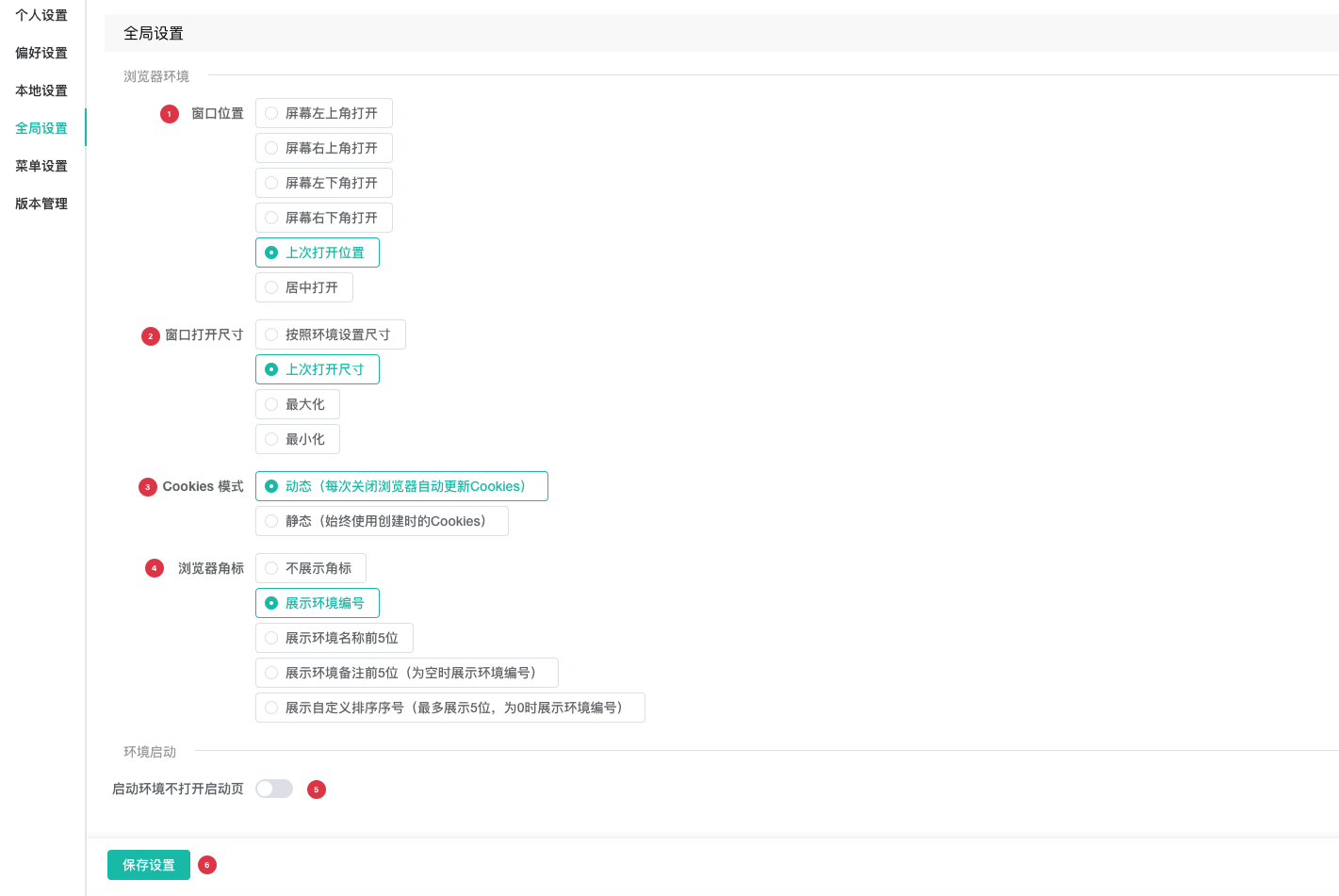
| No. | Feature | Description |
|---|---|---|
1 | Window position | Select upper-left, upper-right, lower-left, lower-right, previous position, or centered as the default browser window location |
2 | Window open size | Select the environment size, last open size, maximized, or minimized for the initial size or state of a launched profile window. Last Open Size restores the previous window size from the profile's user data directory |
3 | Cookie mode | Dynamic updates cookies whenever the browser closes; Static always uses the cookies from profile creation |
4 | Browser badge | Hide the badge or display the profile row number, first 5 characters of the name, first 5 characters of notes, or custom order |
5 | Skip startup page | Prevents the browser startup page from opening during normal or automatic profile launch |
6 | Save Settings | Sends all five settings to remote global configuration and updates the active account's local cache |
Cookie mode affects how login sessions are saved after a profile closes. Before selecting Static, confirm whether the workflow must preserve cookie updates produced during website use.
Menu Settings
Menu Settings appears only in the desktop client and edits sidebar and tab navigation. Standard switches and drag-and-drop changes are written locally and rebuild navigation immediately; no separate local Save button is required.
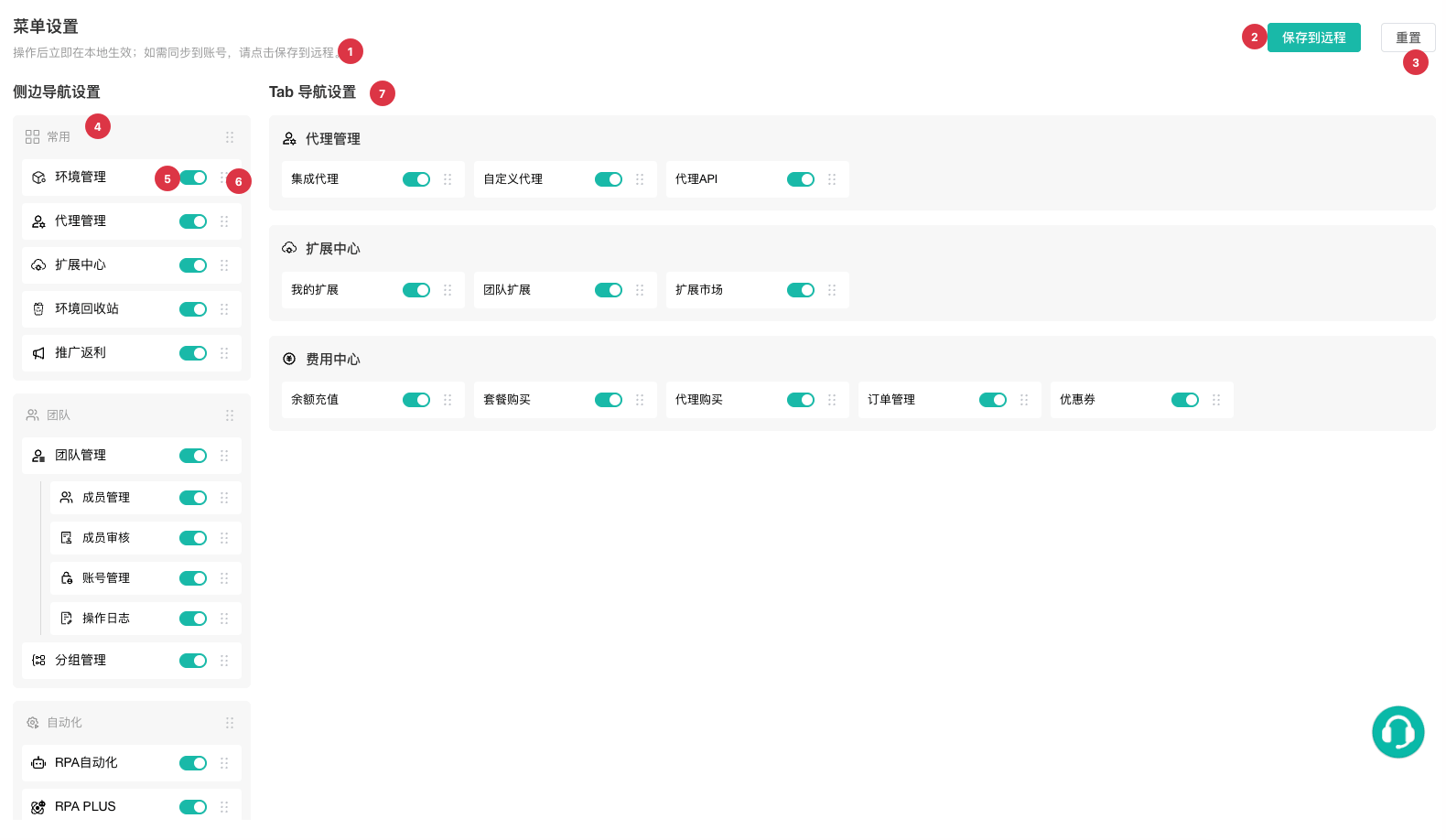
| No. | Feature | Description |
|---|---|---|
1 | Scope notice | Explains that visibility and order changes take effect in local navigation immediately |
2 | Save Remotely | Sends the current menu tree to remote configuration for later restore or synchronization; an API failure does not undo local changes |
3 | Reset | Retrieves the latest menu source and restores defaults; after confirmation, also overwrites the remote menu configuration |
4 | Sidebar navigation | Edits sidebar groups, top-level menus, and submenus |
5 | Visibility switch | Shows or hides a menu; the system prevents hiding the final accessible entry |
6 | Drag to reorder | Reorders same-level groups or menus with a drag handle; incompatible groups reject the item |
7 | Tab navigation | Configures visibility and order of tab navigation items within their groups |
Save and Reset Behavior
| Action | Local result | Remote result |
|---|---|---|
| Change visibility or drag an item | Saves immediately and rebuilds current navigation | Does not submit automatically |
Save Remotely | Preserves the current local configuration | Writes the current menu configuration remotely |
Confirm Reset | Restores defaults generated from the latest menu source | Overwrites remote menu configuration with defaults |
Global Save Settings | Updates the current cache | Saves the five global window, cookie, badge, and startup page settings; does not affect menu configuration |
TIP
Keep at least one frequently used entry visible before editing menus. Menu Settings does not change personal information, local cache, or new-profile preferences. Global Settings does not overwrite menu order.